Codex · Troubleshooting
“Codex Could Not Start”: What the Error Actually Means
30-second triage
| What you see | Most likely cause | Go to |
|---|---|---|
| It appears sometimes, and reopening VS Code fixes it for a while | Renderer timeout — the webview was still booting | Step 1 |
| It appears every time on one machine, especially after an extension update | A specific extension build fails on that setup | Step 2 |
| It started when you turned on a VPN, proxy or corporate gateway | The startup request is being intercepted or delayed | Step 3 |
Step 1 — Is it intermittent? Read the startup timing
An open report from 2026-11-06 (Windows, native VS Code, extension 26.1021.22027) describes exactly this: the sidebar shows both lines, and closing and reopening VS Code — sometimes several times — brings it back. The log line that matters is a startup duration in the tens of seconds, for example [startup][renderer] app routes mounted after 27417ms, with renderer_ready_timeout in the same area (#59857).
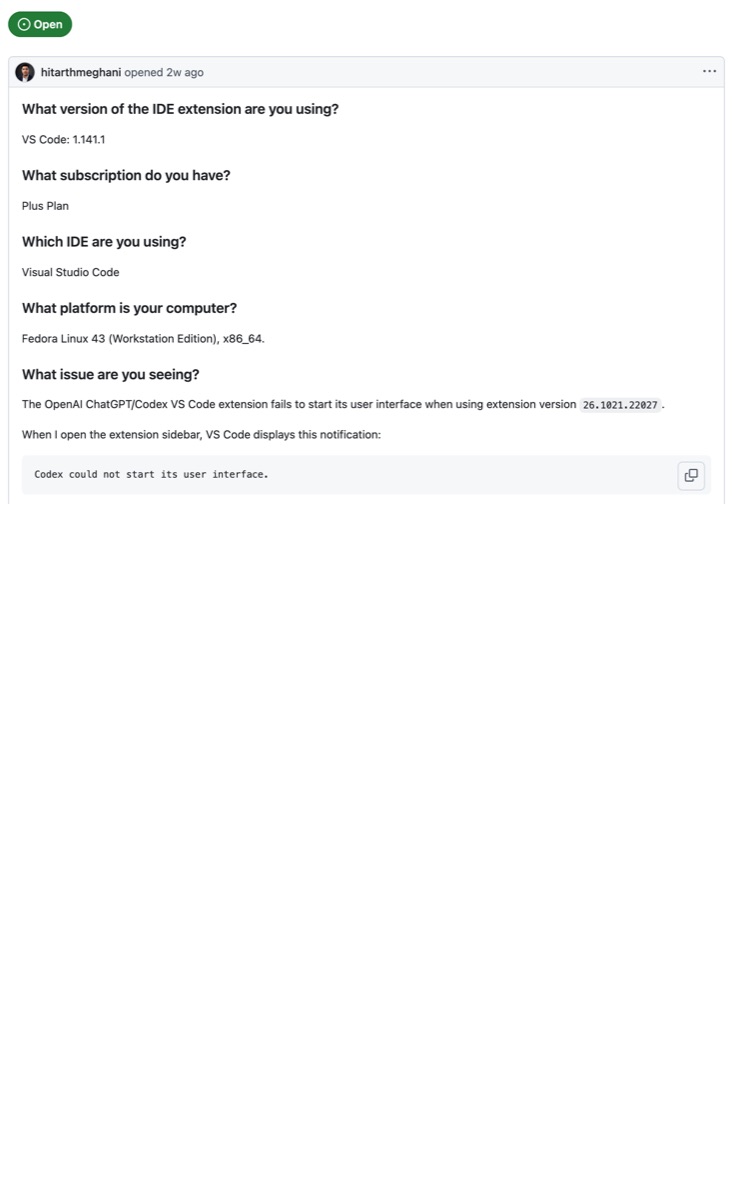
If that matches the “codex could not start” message you are seeing, you are not blocked by configuration: the webview is slow to mount and the extension gives up before it finishes. Reopen the editor, and if it keeps happening on a slow or busy machine, treat it as a startup-time problem rather than a broken install.
Step 2 — Is it always the same extension build?
The larger cluster behind “codex could not start” is a build-level failure rather than a timing one. Six of the eight matching titles we found are the same sentence on different systems, and several name their extension version explicitly — for example #57032 (Fedora Linux, extension 26.1021.22027, with webview errors including Could not find inner client for request and Unrecognized feature: 'local-network-access'), #58811, #57762 (Windows) and #59840 (VS Code Insiders with a remote session).
Practical reading: note your extension version before you change anything, then search the tracker for that version string rather than for the error sentence. Version numbers are specific enough to find the two or three threads that actually match your build.
Step 3 — Is a system proxy or VPN running?
The one closed report in the set is the most actionable: with a system HTTP proxy active (the reporter used VeePN, which registers privoxy as the Windows system proxy at 127.0.0.1:8080), the webview never finished starting, the startup timeout fired, and the extension replaced the UI with the fallback page — while the same machine worked without the proxy (#38088, closed).
So the cheapest test in this whole page is: turn the VPN or proxy off, reload the window, and see whether the sidebar starts. If it does, you have your answer and you can keep the proxy for everything else.
What this error is not
It is not your code, and it is not a filesystem permission problem. Those exist in the tracker too — for instance a Windows report about the runtime re-downloading and failing on cleanup with EPERM (#59992) — but that is a different failure with a different message, and the reporter there explicitly says the cause was not yet confirmed. Mixing the two is how people end up reinstalling an extension that was never broken.
If it still fails: report it once, properly
Most unanswerable reports omit the things a maintainer needs. Include:
Extension version (exact, from the Extensions panel):
VS Code version, and whether it is Insiders or stable:
OS, and whether the window is local, SSH or WSL:
Exact message lines (copy both sentences):
Startup timing from the log (ms), if present:
Proxy / VPN / corporate gateway in use:
What changed right before the first occurrence:
What we are not claiming
This page maps the public reports that use this exact phrase; it does not claim that one of them is your case, and it does not claim a fix we have not seen applied. Where the tracker itself does not confirm a cause — as in the EPERM report above — we say so instead of filling the gap.
Questions people actually ask
Does reinstalling the extension fix “could not start”?
Only when the failure is tied to one extension build. If the log shows a startup timeout or a proxy delay, a reinstall reproduces the same result — check the timing lines first.
Why does it work in one window but not another?
Remote windows (SSH, WSL, containers) and Insiders builds are reported separately in the tracker, and each has its own threads. Compare the two windows' extension version and remote mode before touching the install.
Is this a Codex bug or my machine?
If several people on the same extension build see it, it is the build. If it only appears with a proxy or VPN switched on, it is the network path. The tracker shows both patterns, which is why the message alone cannot tell you.
Does the CLI have the same problem?
No — the CLI does not render a webview, so this message does not apply to it. If the CLI works while the sidebar does not, that is useful evidence for your report.
So what should you do?
Run the three checks in order — it takes about two minutes, and each one leaves you with a fact you can put in a report. If you are still deciding which agent to pay for while you fix this, the plan comparison is the cheaper decision to make first.
Why “codex could not start” has no single fix
The sentence is emitted by the extension shell, not by the thing that failed. A slow renderer, a broken webview build and an intercepted proxy request all end in the same fallback page, which is why searching for the phrase returns threads that describe three unrelated problems. The useful move is not to find “the fix” — it is to shorten the list to one candidate before you change anything.
That ordering matters because the most popular advice online is to reinstall, and reinstalling is also the most destructive step: it removes the version string and the timing lines that would have told you which of the three cases you were in. Two minutes of reading the log is cheaper than an evening of reinstalling.
The pattern behind most reports
Across the eight matching titles we found, the same shape repeats: the sidebar works, an extension update lands, and the next time the editor opens, “codex could not start” appears instead of the panel. Some reporters recover by reopening the window once; others need several attempts; one traced it to a proxy that was switched on the same week. None of them changed their code — the failure sits between the editor and the extension's webview, which is why it feels random.
Next
- Claude Code subscription: which plan do you need? — the cost side of choosing an agent.
- coming Codex not working: the full failure index — every Codex failure pattern we track, in one list.
- coming What is Codex? — if you are still not sure what you installed.